iTakt
A music player for DJs and selectors. Tempo, EQ, effects and harmonic mixing, in the app you listen in every day, on the iPhone, the iPad and the Mac.
DJ tools, everyday player.
Everything a music player is expected to do, plus the tools DJs reach for.
waveforms
Frequency-coloured waveforms show where you are in a track, zoomable from 1x to 50x.
- HI 0.0MID 0.0LOW 0.0
3-band eq
Low, mid and high, from -26 dB to +12 dB, with kill switches.
- 122.0BPM · 0.0%KEY 4A
tempo control
Speed a track up or slow it down with key lock, so the pitch stays where it was.
- MIXES WITH3A · 5A · 4B
bpm & key
Every track is analysed for tempo and key, shown in alphanumeric notation for harmonic mixing.
- FILTERLPF 35%
effects
Filter, delay, reverb and flanger, beat-synced and one swipe away.
- 1Track 041224A2Track 011248A3Untitled 31269B4Untitled 612810B
crates & sets
Crates hold collections, sets freeze a performance sequence in its order.
now playing
A player built for control.
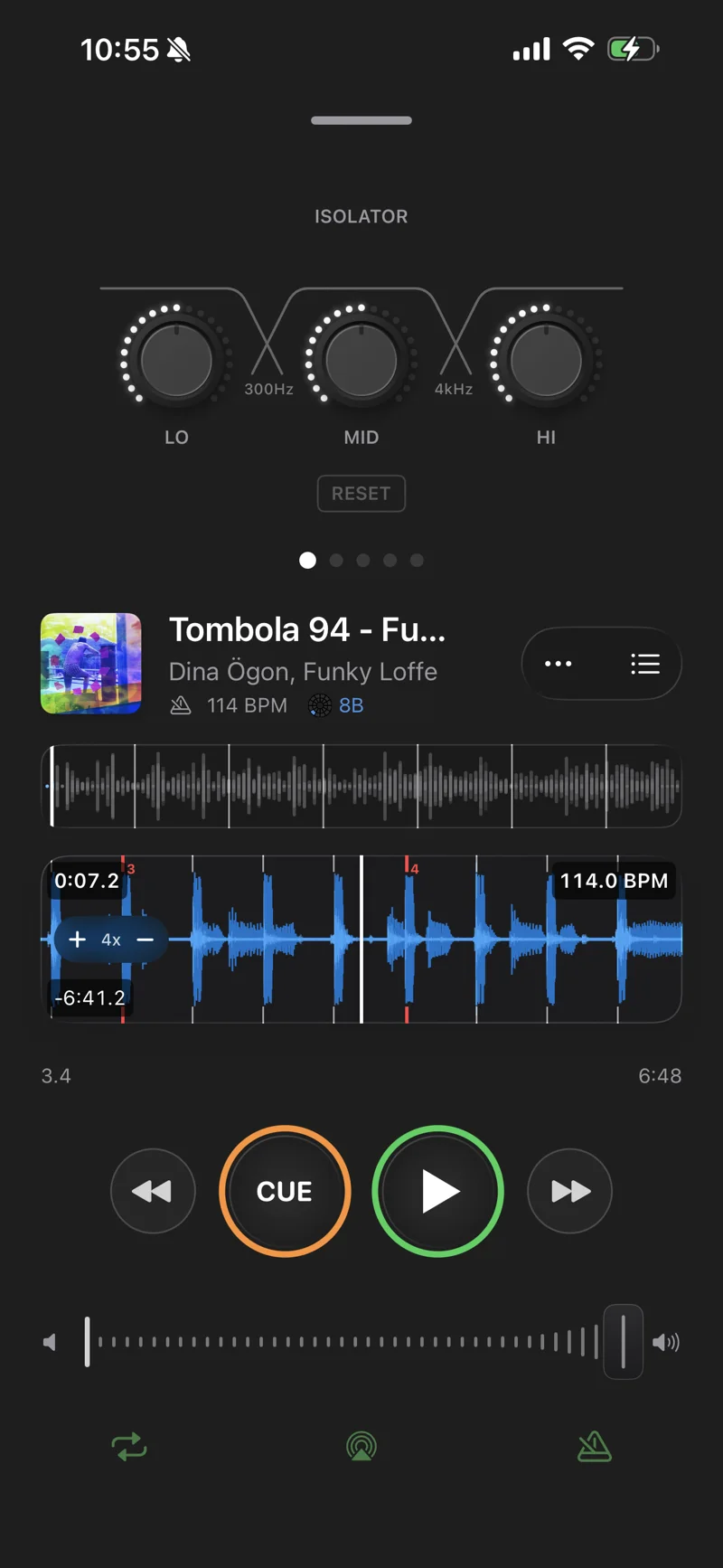
Now Playing keeps DJ-grade tools under the thumb: an effects rack, waveforms precise enough to work from, and a cue that behaves like a CDJ.
effects rack
Swipe through filter, delay, reverb, flanger and the 3-band isolator, all on beat-synced timing.
dual waveforms
An overview of the whole track above a zoomable detail view with beat markers.
bpm & key at a glance
Tempo and key sit right under the track title, where a DJ looks first.
cdj-style cue
Hold to preview from the cue point, release to snap back.
preview
On-beat preview.
Hold any track to hear it against whatever is already playing. If the tempos are close, iTakt beatmatches it for you.
automatic sync
BPMs within range, and the preview locks to the tempo and phrase position of the playing track.
scrub in sync
Scrubbing the preview waveform keeps it locked to the track underneath.
nudge by hand
Swipe the waveform to pull timing straight on vinyl rips and live recordings.
two decks
A mixer designed for your hands.
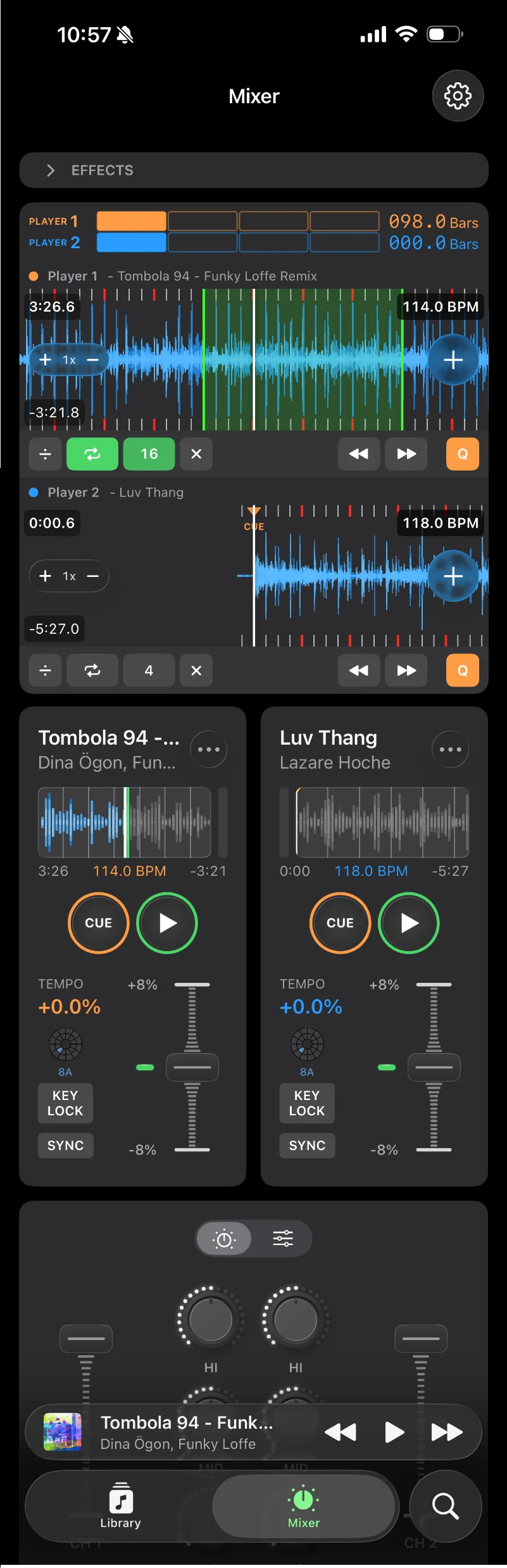
Two players and a full mixer, laid out for touch on the phone and the iPad and for a trackpad on the Mac. Waveforms nudge with a swipe, knobs snap back into their defaults, and a long press on a tempo fader opens a precision mode.
dual players
Synchronised, frequency-coloured waveforms for both decks, zoomable to 50x with beat markers, loop regions and phase alignment.
player controls
Per-deck overview waveforms, hold-to-preview cue buttons, vinyl brake on pause, and tempo faders with key lock.
mixer section
Crossfader, per-channel volume, and a 3-band EQ per deck with kill switches.
effects
Filter, delay, reverb and flanger on beat-synced timing, plus the isolator.
Grids that follow the drift.
Most tracks hold one tempo the whole way through. Live recordings and vinyl rips do not, and a grid that pretends otherwise falls apart halfway in.
regular grid
One tempo and one anchor for the whole track. The normal case.
dynamic grid
Follows a tempo that moves, staying locked through the drift instead of averaging it away. Pin either mode per track when you know better than the analysis does.
- Grid needs review
• No stable tempo section to anchor the grid on
SYNC HELDAUTOMIX HELDgrid confidence
iTakt keeps its own verdict on every grid, with the reasons behind it. Low confidence holds sync and AutoMix back rather than letting them mangle a track.
- DOWNBEAT 2 BEATS LATE
bar phase
Which of a bar's four beats is beat one, tracked separately, because getting it wrong puts every beat in the right place and the downbeat in the wrong one.
- BEAT 1 POSITION0:00.166
grid editor
Fix a grid by hand when the analysis got it wrong, and the correction follows you to your other devices.
Locked by ear, not by the grid.
Sync lines two decks up from their beat grids. Auto-Beatmatch listens to the kicks and holds them there, which is what a vinyl rip needs.
- 125.0 BPM+157 msTap · hold
sync
Tap it to correct tempo and phase once, hold it to keep correcting while both decks play.
- SYNCACQUIRING+40 ms
auto-beatmatch
On by default. It hears both kick drums and trims the phase between them, so a track with a loose grid does not drift out mid-blend.
- 122.43BPM · TRIM 0.00%
tempo trim
When the same correction keeps coming back, the tempo gets a hair, the way a DJ trims the fader.
- +130 msDrag Player 2
nudge
Push a deck forward or back by hand, and the correction holds the alignment you chose.
Every transition, yours to write.
AutoMix plays a sequence and mixes it on its own. Where its choice is not what you had in mind, open the transition and write your own.
- AUTOMIX ON
automix
Off until you switch it on. Near the end of a track it loads the next one, matches tempo, aligns phase and mixes them over 8, 16 or 32 bars.
transition styles
Fade, Rise, Blend and Cut, each a recipe for how the volume crosses, what the EQ does and whether a filter sweeps.
- BAR 6/16DECK ALOW 0.0DECK BLOW KILL
bass swap
The incoming track enters with its bass cut and the decks trade low end at the midpoint, so the bottom never doubles up.
- 16 BARS
transition editor
Set the mix out and mix in points and the length in bars, draw EQ envelopes for low, mid and high by hand, and audition it in place.
- PLAYING TRACK 1AutoMix off✎ 16s · EQ
written by you
A transition you authored runs even when the AutoMix master switch is off.
Harmonic mixing, made simple.
Every track is analysed for musical key and labelled in the notation DJs already read.
- CC#DEbEFF#GAbABbBTRACK 1 OF 5··ANALYZING 0%
key detection
Runs on every track as it is imported, no tagging by hand.
three notations
Alphanumeric, Open Key, or the traditional names.
- MIXES WITH 8B 7A 9A
compatible keys
Highlighted while browsing, so the next record is easy to spot.
- 2 OF 48 TRACKS
- Track 261288A
- Track 361208A
camelot wheel
Interactive, and doubles as a filter over the library.
Your music, your way.
Import from the music on the device and organise it the way a DJ thinks.
local library
Everything stored on the device, ready to play.
- 1Track 041224A2Track 011248A3Untitled 31269B4Untitled 612810B
crates & sets
Sync back to Apple Music as playlists when you want them elsewhere.
- ANALYZING 2 OF 3
- Untitled 71256A
- Track 08–
auto analysis
BPM, key and waveforms are generated in the background.
Not out yet. Say hej and be first to know.
The app is finished and waiting on a launch date. Until there is a store listing, the waiting list is an email.
itakt@westenius.seWhat about streaming?
Apple Music and Spotify have no public API that gives an app the audio access iTakt needs, and a one-person studio does not get to negotiate a partnership. So iTakt works with the music on your device.